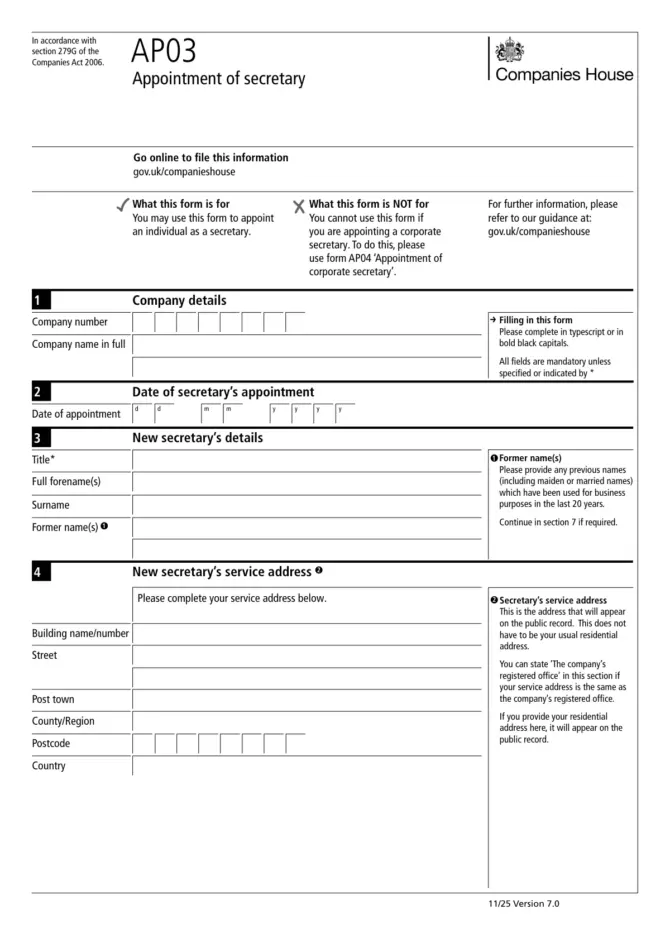
AP03 adds a person as company secretary on the Companies House register: two pages to fill in, and a third with a checklist and presenter details. It cannot appoint a company or firm as secretary; that is form AP04.
Companies House would rather you used its online service, and the GOV.UK page for the form adds one firm rule: a company in the protected online filing (PROOF) scheme must not use the paper form at all. The paper version in use is 7.0 (November 2025), made under section 279G of the Companies Act 2006.

The six sections
- Company name in full and company number.
- Date the secretary was appointed.
- The new secretary’s forenames and surname, with any former names. A title is optional.
- Service address.
- Consent to act, a box the company ticks.
- Authentication by printed name.
Former names
List every name used for business in the last 20 years, maiden and married names included. If they do not fit, section 7 on page 2 carries the rest. Leaving one out is on the checklist of things that get forms returned.
The service address goes public
Whatever you write in section 4 appears on the public register. It does not have to be where the secretary lives, and “The company’s registered office” is acceptable if that is where post should go. It must be a physical place: a PO Box, DX number or LP (Legal Post in Scotland) number is not accepted. Write a home address here and it becomes public.
Consent and authentication
Section 5 is the company’s confirmation that the person in section 3 has agreed to act as secretary. The box must be ticked. It is not the secretary’s own signature.
Section 6 needs only a printed name. Those who can authenticate: a director, the secretary, a person authorised under section 270 or 274, an administrator, administrative receiver, receiver, receiver manager, charity commission receiver and manager, CIC manager or judicial factor. For a UK Societas, “director” is replaced with the organ of the UKS the signatory belongs to.
Before posting
Page 3 has the form’s own checklist. The points it singles out are the ones above: a matching company name and number, a date of appointment, a physical service address, every former name from the last 20 years, the consent tick and the printed name.
Complete it in typescript or bold black capitals. Every field is mandatory unless marked with an asterisk, and the only one marked is the title.
Where it goes
AP03 asks for no payment. If you are not filing online, Companies House’s upload service accepts some forms; otherwise the form sends you to its offices page on GOV.UK for the postal address. Whatever you write on AP03 ends up on the public record, presenter details included.
Official PDF: AP03 — Official PDF (assets.publishing.service.gov.uk)
Other questions
We are appointing an accountancy firm as secretary. Which form?
AP04, the appointment of a corporate secretary. AP03 is only for individuals.
Does the secretary sign anything?
The form has no place for the secretary’s signature. The company ticks the consent box in section 5, and the person filing types their name in section 6.
Sources
- Companies House, AP03 Appointment of secretary, version 7.0, 11/25 (assets.publishing.service.gov.uk)
- GOV.UK, Appoint a secretary (AP03), last updated 18 November 2025 (gov.uk)