Forty-four days. That is how long a landfill operator in Scotland has after the end of each accounting period to get its Scottish Landfill Tax return to Revenue Scotland, and the tax has to arrive by the same date. Revenue Scotland treats a return as made on the day it receives it, not the day it was sent.
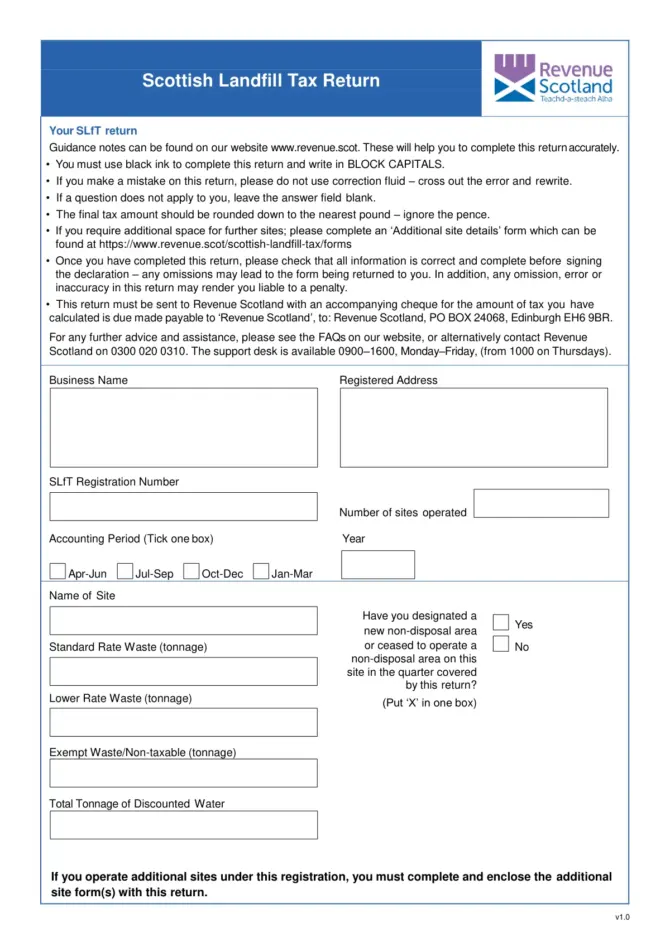
The return is filed online through SETS, Revenue Scotland’s portal. Revenue Scotland also publishes a two-page paper return (version 1.0).

Before you open SETS
The operator must already be registered for SLfT, and the SETS account must be registered and activated. Then gather the waste data. For every waste entry, Revenue Scotland asks for:
- tonnage, split into standard rate, lower rate and exempt
- the EWC code, plus the EWC description and your own more detailed description of the waste
- the geographical area the waste came from
- the management method: incinerated, landfill after treatment, recycled, landfilled, sent offsite or treated onsite
- records of waste moving into and out of non-disposal areas, and of any pre-treatment
- water discount information
If you will claim credits, have the figures ready too: contributions made to the Scottish Landfill Communities Fund, bad debt and permanent removals.
Waste data: upload or type
There are two ways to get waste rows into SETS. You can type each row as you move through the screens, or upload a CSV file. The CSV has to follow Revenue Scotland’s template exactly, in structure and format, or the portal will not take it. Revenue Scotland publishes the CSV template and a source file of EWC codes and local authority area codes alongside the guidance.
When you enter a row by hand, you can type an EWC code directly. If you do not know it, type a description and SETS offers matching codes.
What the return adds up to
On the paper version, page one is the site: name, accounting period (one of Apr to Jun, Jul to Sep, Oct to Dec or Jan to Mar), standard rate, lower rate and exempt tonnages, and total tonnage of discounted water. It also asks whether a non-disposal area was designated or stopped being used on that site during the quarter.
Page two works down to the payable figure:
| Line | What it is |
|---|---|
| Total tax due | Tax on the tonnages declared |
| Total contribution to bodies concerned with the environment | What you paid into the communities fund |
| Credit for bodies concerned with the environment claimed | The credit you take for that contribution |
| Credit for bad debt claimed | The bad debt figure you are claiming |
| Credit for permanent removals claimed | The permanent removals figure you are claiming |
| Total credits | The three credits added together |
| Tax payable | Tax due less total credits |
The paper form says to round the final tax down to the nearest pound and ignore the pence. An operator with more than one site completes an “Additional site details” form for each extra site.
The return ends with a declaration by the taxpayer that it is correct and complete to the best of their knowledge. Revenue Scotland warns that false information can bring penalties or prosecution, and that an omission or error can also lead to a penalty.
After you submit
SETS shows a confirmation page with a transaction reference number. Designated officers at Revenue Scotland review SLfT returns and may write asking for documents or more information.
Late returns and late payment can lead to interest and penalties. Revenue Scotland’s guidance points to its own references RSTP4002 for interest and RSTP3005 and RSTP3008 for penalties.
Correcting a return
For up to 12 months after the filing date you amend the return yourself in SETS: on the Dashboard choose “all returns”, pick the return and select “Amend”. After 12 months, and for up to five years after the filing date, amendments have to be made in writing to slft@revenue.scot, with the reasons set out clearly.
About the paper return
The paper form (v1.0) tells you to write in black ink and block capitals, cross out mistakes instead of using correction fluid, and post the return with a cheque payable to “Revenue Scotland” to PO Box 24068, Edinburgh EH6 9BR. Revenue Scotland’s current guidance page describes only the online route through SETS. Before posting a paper return, check with Revenue Scotland on 0300 020 0310 that it will still be accepted and how payment should be made.
Official PDF: SLfT Return — Official PDF (revenue.scot)
Sources
- Revenue Scotland, Submit an SLfT return, last updated 29 May 2024 (revenue.scot)
- Revenue Scotland, Scottish Landfill Tax Return, paper form v1.0 (revenue.scot)