SA402 is the HMRC form for registering a partner that is not a person: a company, a trust, another partnership, a county council or a registered pension scheme that has joined a partnership. HMRC uses the answers to decide which tax returns the new partner will have to make. The edition on GOV.UK is the two-page HMRC 08/23 version, and registration is by post only.
Who fills in SA402, and which partners use a different form
The form is completed by whoever is responsible for registering the partner. The GOV.UK guidance names a trustee or a company secretary as examples of the person who should sign it. Where the partner is itself a partnership or a trust, the form has to be completed by the nominated partner or the trustee. The nominated partner is the partner the partnership has nominated to receive and submit its partnership returns.
The form points elsewhere for the neighbouring cases:
- A partner who is an individual uses SA401, Registering a partner for Self Assessment and Class 2 NICs.
- The partnership registers separately on SA400, Registering a partnership for Self Assessment.
- An agent acting for the partner needs authority, either through form 64-8 Authorising your agent or an online authorisation the agent sets up.
Every partner completes its own SA401 or SA402. A partnership that takes on a company and a trust as partners therefore sends two SA402s, one for each.
How to complete SA402, question by question
Page 1 is about the partner, page 2 about the partnership it joined, and the declaration closes page 2. Questions 6, 7, 8 and 17 apply only in the situations shown in the right-hand column.
| Question | What to enter | When it applies |
|---|---|---|
| 1 Name of partner | The name of the company, trust, partnership, council or scheme joining | Always |
| 2 Type of partner | The form’s examples are company, partnership, trust and county council | Always |
| 3 and 4 | The partner’s business address with postcode, and its phone number | Always |
| 5 | Whether the partner is resident in the UK, Yes or No | Always |
| 6 | The partner’s Unique Taxpayer Reference (UTR) | If the partner has registered for Self Assessment or Corporation Tax before |
| 7 | The partner’s Company Registration Number (CRN) | If the partner is a Limited Liability Partnership (LLP) or a Limited Partnership (LP) |
| 8 | The Pension Scheme Reference Number | If the partner is a registered pension scheme |
| 9 and 10 | Name and address, with postcode, of the partnership joined | Always |
| 11 | Nature of the partnership’s business, for example plumbers, investment business or electrical engineers | Always |
| 12 | Date the partner joined, as DD MM YYYY | Always |
| 13 | Whether SA400 has been completed for the partnership, and in some cases the partnership’s CRN | Always; the No answer branches (next section) |
| 14 | The partnership’s UTR | If known |
| 15 and 16 | Your name and the capacity in which you sign | Always |
| 17 | Your own UTR | Only if you ticked nominated partner or trustee at 16 |
| 18 and 19 | Your address with postcode, and your phone number | Always |
| Declaration | Signature and date, DD MM YYYY | Always |
Question 7 is for a partner that is itself registered at Companies House as an LLP or LP; its CRN is the number on that registration. An LLP formed on paper registers with LL IN01. At question 8 the form says Pension Scheme Reference Number, while the GOV.UK checklist for SA402 calls the same item the Pension Scheme Tax Reference (PSTR).
Question 13, the declaration and who signs
Question 13 asks whether SA400 has been completed for the partnership the partner joined. With a Yes, go straight on to question 14. With a No, the form splits by the partnership’s type and the date it was registered at Companies House:
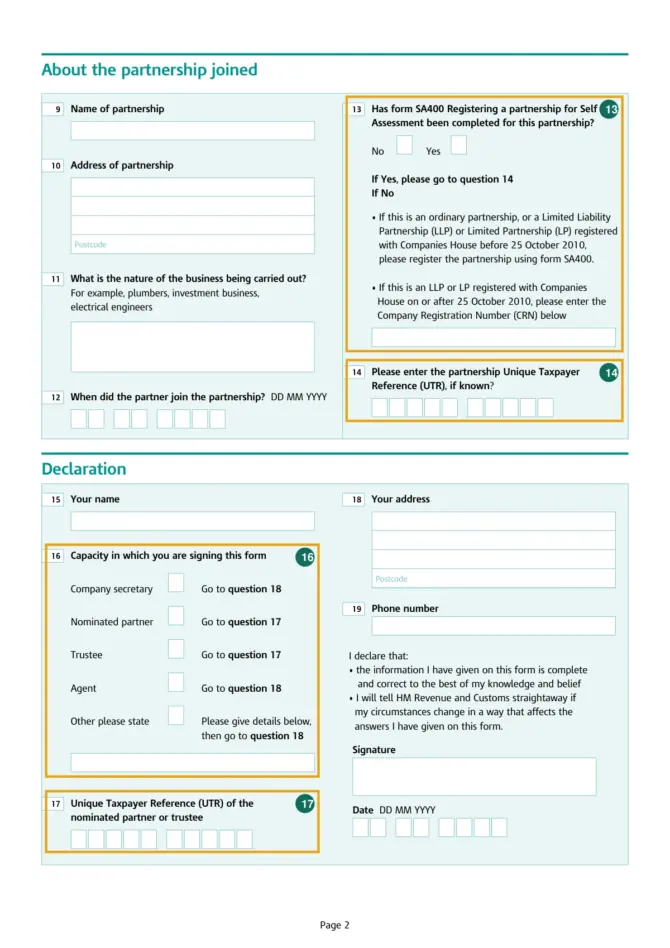
- An ordinary partnership, or an LLP or LP registered with Companies House before 25 October 2010: register the partnership on SA400.
- An LLP or LP registered with Companies House on or after 25 October 2010: write the partnership’s CRN in the box under question 13.
Question 16 decides the route through the rest of page 2. A company secretary or an agent ticks the box and moves to question 18. A nominated partner or a trustee goes to question 17 and enters their own UTR there. Anyone signing in another capacity ticks “Other”, describes the capacity in the box underneath and carries on at question 18. When a trust joins a partnership, then, the trustee signs, ticks Trustee and completes question 17; on a form for a company partner signed by its company secretary, question 17 stays blank.
By signing, you declare that the information is complete and correct to the best of your knowledge and belief, and you undertake to tell HMRC straightaway if your circumstances change in a way that affects the answers on the form.
Where to send SA402 and the ways to fill it in
HMRC takes SA402 on paper only. You can fill in the online version on GOV.UK and print it, complete the PDF on screen and print it, or print the blank PDF and fill it in by hand. The online version cannot save your progress, so gather every reference in the table before you open it. For on-screen completion of the PDF, HMRC says to save the file on your computer and open it in the latest free version of Adobe Reader; the form may not work if you open it in your internet browser. A Welsh-language SA402 is published on the same GOV.UK page.
Post the signed form to:
HM Revenue and Customs
National Insurance Contributions and Employer Office
BX9 1AN
A completed 64-8 can go in the same envelope, as can the partnership’s SA400 and any other SA401 and SA402 forms. The form asks you not to attach anything else.
Official PDF: SA402 — Official PDF (assets.publishing.service.gov.uk)
When HMRC replies
HMRC says it will usually contact you within 15 days of receiving the form, and that it may take longer during busy periods. If you have heard nothing after 3 weeks, its check when you can expect a reply page gives the current position. The help line printed on SA402 is 0300 200 3500, or +44 191 203 7010 from outside the UK.