Delaware Form ATH-RTF lets the Division of Revenue disclose confidential state tax information to a person or organization you name. If a new accountant needs to inspect a particular year’s Delaware return, you can specify the tax and period on this form. The authority covers inspection and receipt of information. Representation before the Division requires separate authority.
Who signs the Delaware tax disclosure authorization
The Division lists ATH-RTF under its current personal income tax forms, with 8821DE as its former number. The authorization also has boxes for business taxes. The taxpayer whose information will be disclosed signs it. When the authorization covers a joint return, both spouses sign.
How to fill out Delaware ATH-RTF
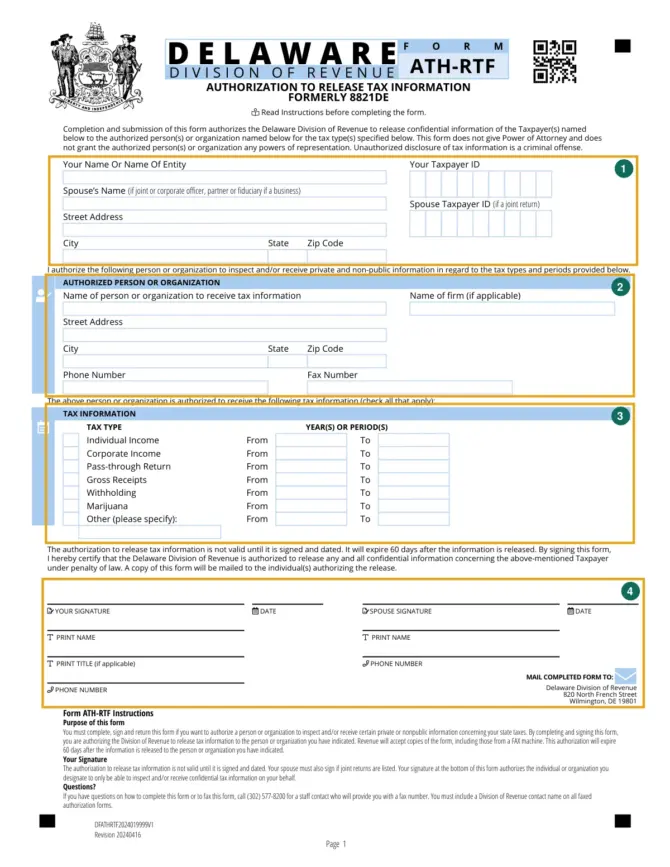
The one-page PDF includes the form and its instructions. The numbers on the image identify the taxpayer, recipient, tax periods and signature blocks.
| Block | What to enter |
|---|---|
| 1. Taxpayer | Enter your name or the entity name, taxpayer ID and street address, city, state and ZIP code. For joint returns, add your spouse’s name and taxpayer ID. The second name field also accommodates a corporate officer, partner or fiduciary for a business. |
| 2. Authorized recipient | Identify the person or organization that may receive the records. Give the firm name if applicable, along with the recipient’s address, phone and fax details. |
| 3. Tax types and periods | Check each tax that the recipient may inspect and complete its From and To fields. The form lists individual income, corporate income, pass-through return, gross receipts, withholding and marijuana. Use the Other row and specify the tax if it has no listed box. |
| 4. Signatures | Sign and date the taxpayer line, print your name and give your phone number. Enter your title if applicable. For a joint return, have your spouse sign and date the second line and enter their printed name and phone number. |
If the recipient needs both a corporation’s gross receipts information and its withholding records, mark the two tax rows and specify the period in each. The form limits disclosure by tax and period, even when both requests name the same recipient.
Where to send the signed form
Mail the completed form to Delaware Division of Revenue, 820 North French Street, Wilmington, DE 19801. The Division accepts copies, including by fax. To obtain a fax number, call (302) 577-8200 and ask for a staff contact. Put the Division contact’s name on the faxed authorization.
The authorization takes effect once signed and dated. Its 60-day expiration period starts when the Division releases the information. The form says the Division will mail a copy to the person or people who authorized the release.
Official PDF: Form ATH-RTF — Official PDF (revenuefiles.delaware.gov)