Form 8821 lets a named person or organization inspect or receive your confidential IRS tax information. You control the taxes and periods covered. It does not let that person argue your case or sign agreements on your behalf; representation requires a different authorization, such as Form 2848.

Who uses Form 8821?
You can authorize an individual, corporation, firm, organization or partnership. For example, you may need a lender to receive income information or want someone helping with an IRS matter to see the relevant records. This guide uses the January 2021 form and September 2021 instructions, together with the IRS’s current filing guidance.
A joint return does not make one spouse’s signature sufficient for both taxpayers. Each spouse signs a separate Form 8821 to authorize disclosure of their information. For a trust, estate or business, the signer must have the authority required by the instructions; an executor or trustee may also need Form 56 to establish the fiduciary relationship.
How to fill out lines 1 through 6
Separate the taxpayer’s details from the recipient’s details. Line 3 then defines what the recipient may access, while lines 4 and 5 determine how the authorization is handled and whether earlier authorizations remain in place.
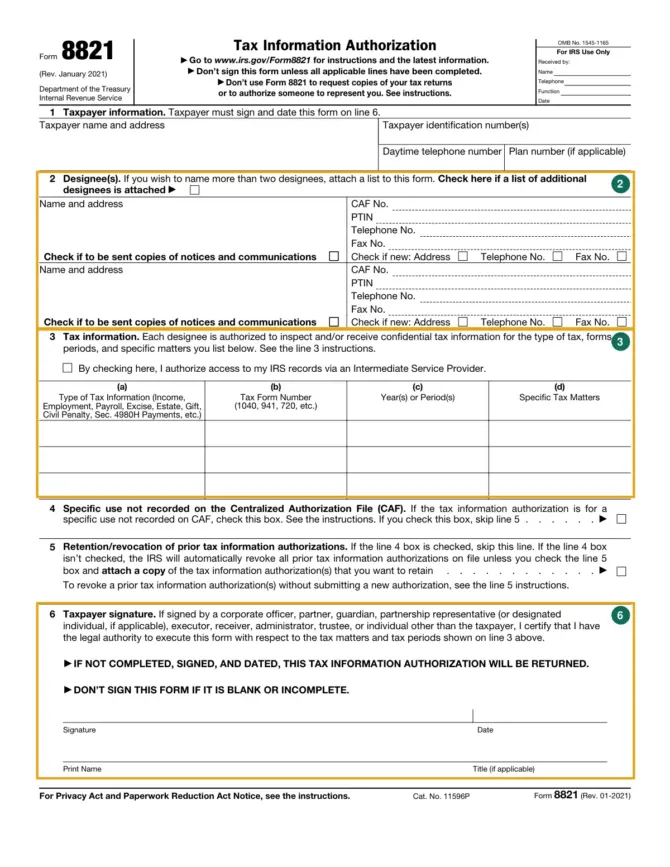
| Line | What to enter or select | Record to consult |
|---|---|---|
| 1 | Taxpayer name, address, identification number and contact details; plan number if applicable. | The taxpayer’s return and identification records. |
| 2 | Each designee’s name, address and requested identifiers. Select notice copies separately. | The designee’s contact and CAF details. |
| 3 | Tax type, form number, years or periods and any restriction to specific information. | The returns or IRS matter covered by the authorization. |
| 4 | Check for a specific use that will not be recorded on CAF. | The specific-use examples in the instructions. |
| 5 | If applicable, select retention and attach earlier authorizations you want to preserve. | Copies of the earlier authorizations. |
| 6 | Sign, date, print the name and enter the signer’s title if applicable. | The instructions for the taxpayer’s legal status. |
If a designee has no Centralized Authorization File number, enter “NONE.” If one has already been assigned, reuse it. More than two designees can be listed on an attachment, but no more than two may receive copies of notices for the same matters.
Choosing the tax years and access limits
Do not enter “All years,” “All periods” or “All taxes.” The IRS says it will return authorizations using those general references. For a request concerning an individual income-tax return, identify Income, Form 1040 and the particular year or years. Fiscal years use the ending year and month in YYYYMM format.
Column (d) limits the information to a specific matter, such as a balance due or lien information. Enter “not applicable” there if you are not limiting the information already described in columns (a) through (c). For estate-tax matters, use the decedent’s date of death in the period field.
The checkbox above the line 3 table permits access through an Intermediate Service Provider. The designee is not authorized to use such a provider unless that box is checked. Review that permission separately from the tax years and notice-copy choices.
Specific uses and earlier authorizations
Line 4 applies to requests that the IRS will not record on CAF, including disclosure to a loan company or for certain background checks. Send that authorization to the IRS office handling the matter and skip line 5. A specific-use authorization does not revoke earlier authorizations.
For a CAF-recorded authorization, the IRS instructions say earlier tax information authorizations are automatically revoked unless you check line 5 and attach the ones you want to keep. To revoke an authorization without replacing it, the instructions provide a separate procedure: mark the existing authorization “REVOKE,” add a current signature and date, and send it to the appropriate IRS office.
When and where to submit Form 8821
For a non-IRS purpose such as lender income verification, the IRS must receive the form within 120 days of the taxpayer’s signature. That receipt rule does not apply when the purpose is assistance with an IRS tax matter.
Use the official PDF and filing guidance below. A mailed or faxed form requires a handwritten signature. Electronically signed forms must be submitted through the IRS online upload route; remote electronic signing also carries identity-verification requirements for a third-party submitter, explained in the instructions. For mail or fax, choose the destination from the instructions’ location chart, except for line 4 requests sent to the office handling the matter.
The IRS warns that duplicate submissions can delay processing. Check its processing status before sending another copy. An unsigned, undated or incomplete Form 8821 will be returned.
Entering an address here does not change the taxpayer’s last known IRS address. Use Form 8822 for a home-address change or Form 8822-B for a business-address change. If you need advice about the scope of access to grant, discuss the tax matter with a qualified adviser before signing.
Official PDF: Form 8821 — Official PDF (irs.gov)