Schedule LEP tells the IRS which language you prefer for written communications. You attach it to your income tax return and choose one option. It can also cancel a previous language election so future correspondence returns to English.
The IRS publishes the form as Schedule LEP (Form 1040), Rev. December 2024. Its second page contains the filing instructions. The separate IRS Schedule LEP instructions describe the same language request and cancellation process.
Who can file Schedule LEP?
Taxpayers with limited English proficiency can file the schedule voluntarily to request or change the language of IRS written communications. The form lists Form 1040, 1040-SR, 1040-NR and 1040-SS as the returns to which it can be attached.
The request covers correspondence such as letters, notices, forms, instructions and publications. The IRS warns that translations may not be available immediately: English communications continue until the material is translated into the preferred language. Filing this request does not promise that every notice will arrive in that language.
How to complete the name, taxpayer number and line 1
Use the name exactly as shown on the income tax return. The taxpayer identification number belongs to the person making this language request.
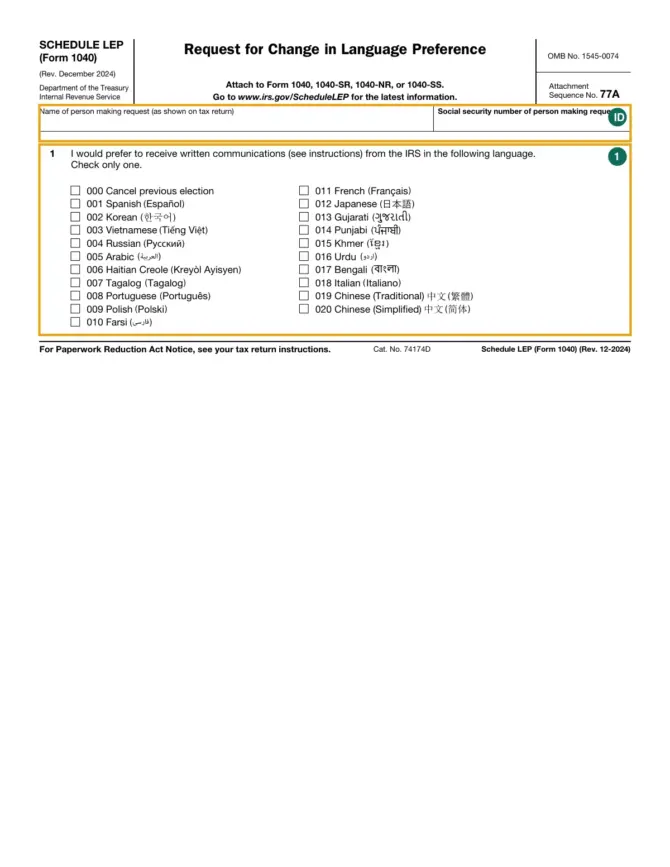
| Entry | What to provide | Instruction |
|---|---|---|
| Name | The requesting person’s name as it appears on the return. | A joint return can have a separate request for each spouse. |
| Social security number | The requesting person’s SSN, matching the return. Use an existing ITIN wherever an SSN is requested if you have an ITIN. | For a joint return, enter only the number of the spouse making this request. |
| Line 1 | One language box, or 000 to cancel a previous election. | Choose only one option. |
The listed choices are 001 Spanish, 002 Korean, 003 Vietnamese, 004 Russian, 005 Arabic, 006 Haitian Creole, 007 Tagalog, 008 Portuguese, 009 Polish, 010 Farsi, 011 French, 012 Japanese, 013 Gujarati, 014 Punjabi, 015 Khmer, 016 Urdu, 017 Bengali, 018 Italian, 019 Traditional Chinese and 020 Simplified Chinese. There is no write-in language field.
The instructions direct a nonresident or resident alien without an SSN who is not eligible for one to apply for an ITIN using Form W-7. The schedule itself has no separate address or signature field.
Joint returns and changing an earlier selection
Each spouse preferring an alternative language files a separate Schedule LEP. This also applies when both spouses prefer the same language; one jointly completed schedule does not replace the two individual requests.
A selection applies to future written communications, including correspondence about other tax years, until it is changed or canceled. To cancel, choose 000 and file a new Schedule LEP with a return for a subsequent tax year.
Official PDF and how to file the request
Download the official Schedule LEP PDF and read both pages. File it with the income tax return; the instructions say this preference is stated only by attaching the schedule to the return. It can accompany the current year’s return or a subsequent year’s return, but not a return for a year before 2020.
If you e-file the schedule with your return, do not also file a paper copy. The delivery route is the route used for the underlying return, rather than a separate language-request mailing address.
The instructions also point to IRS language resources and the Volunteer Income Tax Assistance and Tax Counseling for the Elderly programs for possible help preparing a return. Those resources do not change the one-choice and separate-spouse filing rules.