A parent S corporation uses Form 8869 to elect qualified subchapter S subsidiary status for a domestic corporation whose stock it owns in full. For federal tax purposes, the election treats the subsidiary as liquidated into the parent and attributes its assets, liabilities and tax items to the parent. The IRS still lists the December 2020 revision.
Which subsidiaries qualify for the election
The parent must own 100% of the subsidiary’s stock and the subsidiary must be eligible when the election is made. A bank or thrift that uses the section 585 bad-debt reserve method, an insurer taxed under subchapter L, and a domestic international sales corporation or former DISC are ineligible.
A subsidiary that previously existed as a separate corporation may need a final return. The deemed liquidation itself requires no Form 966. For an eligible holding-company reorganization described in Revenue Ruling 2008-18, the instructions say the old S corporation has no final return requirement and the new parent has no separate Form 2553 requirement.
How to fill out Form 8869
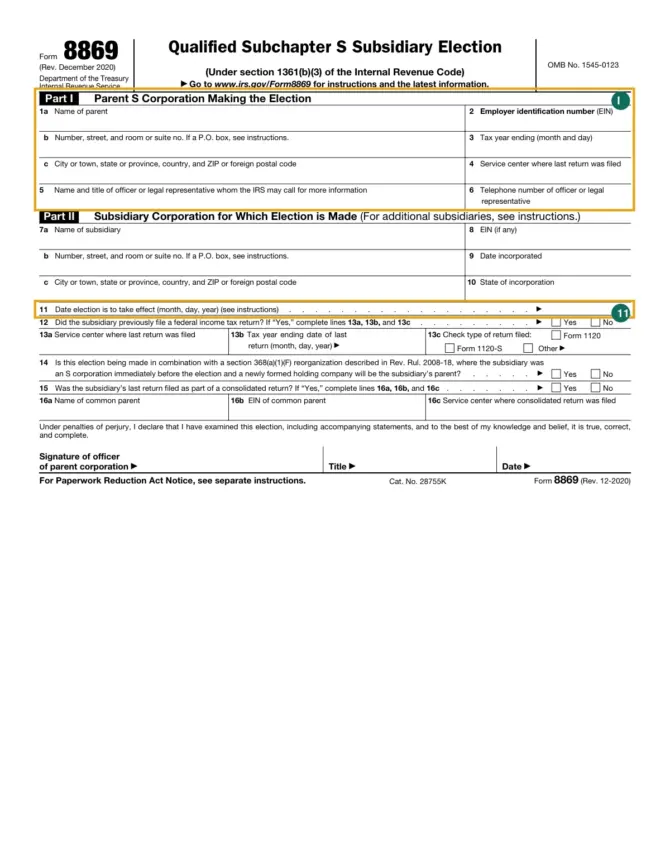
Gather the parent and subsidiary records separately. The parent’s last filing center belongs on line 4. The subsidiary’s filing history belongs in Part II and can determine where to send the election.
| Lines | What to enter |
|---|---|
| 1a to 6 | Give the parent’s name and address, EIN, tax year-end month and day, and the service center that received its last return. Identify the officer or legal representative the IRS may contact and give their telephone number. |
| 7a to 10 | Give the subsidiary’s name and address, EIN, incorporation date and state. Enter “Same as parent” if it shares the parent’s address. The instructions allow a P.O. box when the postal service does not deliver to the street address. |
| 11 | Enter the requested effective date. For a new subsidiary whose election should take effect on formation, use the formation date. |
| 12 and 13a to 13c | If the subsidiary previously filed a federal income tax return, identify the last service center, tax year-end date and type of return. Select Form 1120, Form 1120-S or specify the other form. |
| 14 | Mark Yes for the section 368(a)(1)(F) reorganization described in Revenue Ruling 2008-18, where a new holding company becomes parent of the former S corporation. |
| 15 and 16a to 16c | If the subsidiary’s last return was consolidated, identify the common parent’s name and EIN and the service center that received the consolidated return. |
| Declaration | An officer authorized to sign the parent’s S corporation return signs and dates the election and gives their title. |
Use the EIN the subsidiary previously filed under, even if its return was consolidated. In the reorganization covered by line 14, the old S corporation keeps its EIN and the new parent obtains its own. If the subsidiary has no EIN, the IRS instructions say to put “N/A” on line 8. If it applied and has yet to receive one, enter “Applied For”.
For multiple subsidiaries, attach a separate sheet for each additional subsidiary using the Part II layout and line numbers. Put the parent name and EIN at the top. For elections effective on the same date for a tiered group, the parent can specify the order of deemed liquidations in an attachment. The IRS otherwise starts at the lowest tier and works upward.
When the election can take effect
The requested date is generally at most 12 months after filing or 2 months and 15 days before filing. If the requested future date is too far away, the IRS uses the date 12 months after filing. If the requested past date is too early, the usual effective date is 2 months and 15 days before filing. The instructions describe relief for reasonable cause and refer to Revenue Procedure 2013-30 for cases that may qualify without a private letter ruling and user fee.
Where to mail Form 8869 and confirm receipt
Send the signed election to the IRS service center where the subsidiary last filed. If the parent forms a new subsidiary and makes a valid election effective on formation, use the center where the parent last filed. Keep the election and evidence of mailing, such as a timely postmarked certified or registered mail receipt.
The IRS generally issues a determination within 60 days of filing. If two months have passed since mailing without an acceptance or rejection, the instructions direct you to call 800-829-4933. An accepted election continues until terminated. After termination, IRS consent is generally required to elect again for that subsidiary or successor before the fifth tax year following the first year the termination took effect.
Official PDF: Form 8869 — Official PDF (irs.gov)