A skip-person recipient uses Form 706-GS(D) to calculate generation-skipping transfer tax on taxable distributions from a trust. Start with the trustee’s Forms 706-GS(D-1). The December 2025 revision of 706-GS(D) says it is for distributions made after December 31, 2024; the IRS form page lists it as the current revision.
Who files, and when no return is needed
In general, a skip person receiving a taxable trust distribution must file. The trustee supplies the notification on Form 706-GS(D-1). If the inclusion ratio is zero for every distribution on the notices, the instructions say no 706-GS(D) is needed. If a return is required for other distributions, omit the zero-inclusion-ratio distributions.
Report by calendar year even if your income tax accounting period is different. Determine the skip-person status and inclusion ratio from the trust’s GST records and notices; get estate-tax advice if either is disputed. This return concerns distributions, rather than the trust’s separate reporting of other generation-skipping events.
What changed in the December 2025 revision
The IRS instructions describe these changes: Part I’s entries were reorganized and expanded for foreign addresses; tax computation moved to Part II; distributions moved to Part III on page 2 with more entry lines; and refund direct-deposit details were added at 10b–10d. The updated payment guidance recommends electronic payment and direct deposit when possible for filers with access to US banking or electronic payment systems, and points balance-due filers to the IRS payment options.
How to complete Parts I and III
Enter the distribution calendar year at the top. Complete the recipient information, then finish page 2’s distributions before calculating the tax on page 1. Attach copies of all relevant Forms 706-GS(D-1) and keep your own copies.
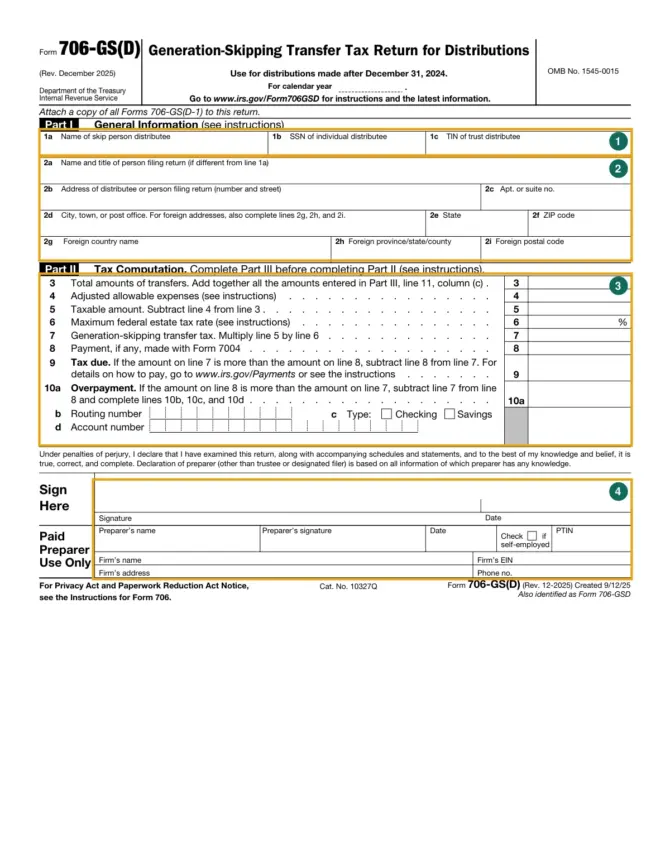
| Entry | What to put there | Source |
|---|---|---|
| 1a | The skip-person distributee’s name; a trust recipient uses its trust name | The recipient’s legal identity and trustee notice |
| 1b or 1c | An individual recipient’s SSN in 1b, or a trust recipient’s TIN in 1c | Complete one of these lines, not both |
| 2a | Name and title of the different person filing | Trustee for a trust recipient, or the legally responsible person for a minor or an individual unable to file |
| 2b–2i | Correspondence address, including apartment/suite, city, state and ZIP; use the foreign country, province/state/county and postal-code fields for a foreign address | Normally the filer in 2a’s address when that line is completed |
| Part III 11(a) | Each distributing trust’s TIN | Form 706-GS(D-1), line 2b |
| Part III 11(b) | The corresponding distribution item number | Keep the notice’s item number; different trusts can have repeated numbers |
| Part III 11(c) | The tentative transfer, not simply the unadjusted distribution value | The notice’s tentative-transfer entry, subject to the valuation instructions |
Duplicate page 2 if additional entries are needed and include those transfers in the Part II line 3 total. If the trustee omitted the value or tentative transfer, or you disagree with it, attach a statement giving your amounts and calculation.
To calculate a tentative transfer, multiply the applicable inclusion ratio by the distribution value. Value property at fair market value on the distribution date, taking its location and normal public market into account; forced-sale values are not the standard. Reduce the property value by consideration supplied by the recipient. For real estate, subtract an outstanding lien at distribution, attach its documents and explain the valuation with appraisal copies.
Closely held or inactive stock requires valuation using net worth, earnings, dividend capacity and other relevant factors. Attach balance sheets, especially the one nearest distribution, and net-earnings or operating-results statements and dividends for each of the preceding five years. Refer to the official Form 706 instructions for detailed valuation methods.
Part II: expenses and the tax calculation
Bring the completed distribution schedule to the tax computation. The current form’s distribution-date restriction means the instructions’ 40% maximum-rate row applies to distributions within its stated post-2024 use period.
| Line | Calculation or entry | Record needed |
|---|---|---|
| 3 | Total all Part III column (c) transfers, including continuation sheets | The trustee notices and any replacement valuation statement |
| 4 | Adjusted allowable expenses | Eligible expenses multiplied by the relevant inclusion ratio; allocate where ratios differ |
| 5–7 | Line 3 minus line 4; applicable maximum estate tax rate; line 5 multiplied by that rate | For this form’s post-2024 distributions, line 6 is 40% |
| 8–9 | Payment made with Form 7004; tax due when line 7 exceeds line 8 | Proof of the extension payment |
| 10a–10d | Overpayment when line 8 exceeds line 7, with refund bank details | The account and routing information described below |
Allowable expenses concern preparing this return or determining, collecting or refunding its GST tax. Multiply total allowable expenses by the inclusion ratio. If there are different ratios, first allocate the expense by each distribution’s relative value, then apply that distribution’s ratio. Do not subtract an unadjusted preparer’s bill from line 3.
For illustration, two distributions valued at $12,000 and $18,000 have ratios of 0.25 and 0.50. An eligible $300 expense is allocated $120 and $180; the adjusted deductions are $30 and $90, totaling $120. This example illustrates the instructions’ allocation method without reusing the IRS example.
An expense may qualify before payment if its amount is clearly ascertainable when filing. If another allowable expense arises after filing, the instructions direct a refund claim on Form 843. Keep the supporting calculations and invoices.
Refund details, payment and signatures
For an overpayment, the instructions recommend direct deposit where US banking is available. Put a nine-digit routing number in 10b; its first two digits must be 01–12 or 21–32. Ask the institution when a deposit slip differs, the account is savings without checks or the checks are payable through another institution. Select only one account type, checking or savings, in 10c.
Line 10d accepts up to 17 account-number characters, including letters and numbers. Include hyphens but omit spaces and special symbols; enter from the left, leave unused boxes blank and do not include the check number. An overpayment below $1 is refunded only on written request.
For tax due, the instructions describe EFTPS, a same-day wire through your financial institution, checks and the IRS’s participating-retailer cash-payment route. Check the applicable requirements at IRS Payments. Make a check payable to United States Treasury and write the individual recipient’s SSN or trust recipient’s TIN and “Form 706-GS(D)” on it. Electronic payment does not itself submit the paper return.
The distributee or authorized representative signs and dates the return. A self-prepared return leaves the paid-preparer area blank, and an unpaid helper does not sign that area. A paid preparer generally signs and enters their name, date, PTIN, firm name/address, firm EIN and phone, checking self-employed when applicable, and gives the recipient a completed-return copy. The IRS permits specified mechanical, stamped or software preparer signatures.
Filing dates and the correct delivery address
Generally file between January 1 and April 15 of the year after the distribution calendar year. A timely Form 7004 requests an automatic six-month filing extension; file it by the regular due date. The instructions say an extension does not stop interest on tax unpaid by its due date. The return itself still needs its signature even though the automatic extension request does not require a signature or reason.
| Submission | Delivery method | Address |
|---|---|---|
| Original return | Postal mail | Department of the Treasury, Internal Revenue Service Center, Kansas City, MO 64999 |
| Original return | IRS-designated private delivery service | Internal Revenue Submission Processing Center, 333 W. Pershing, Kansas City, MO 64108 |
| Supplemental return | Postal or designated private delivery | Internal Revenue Service Center, Stop 824G, 7940 Kentucky Drive, Florence, KY 41042-2915 |
For a correction after filing, submit another Form 706-GS(D) marked “Supplemental Information” across the top of page 1, explain the changes, attach supporting information and a copy of the original return. If the return has already been selected for examination, provide the information directly to the examining office. Private delivery services must be IRS-designated for the timely-mailing rule, and cannot deliver to PO boxes.
The instructions explain late-filing, late-payment and valuation-understatement penalties and interest. If a penalty/interest notice arrives, send the reasonable-cause explanation in response; the IRS says not to attach such an explanation with the initial return. For an existing IRS account issue that requires disclosure to a third party, Form 8821 concerns the separate tax-information authorization; it does not replace this return’s signature.
Official PDF: Form 706-GS(D) — Official PDF (irs.gov)